
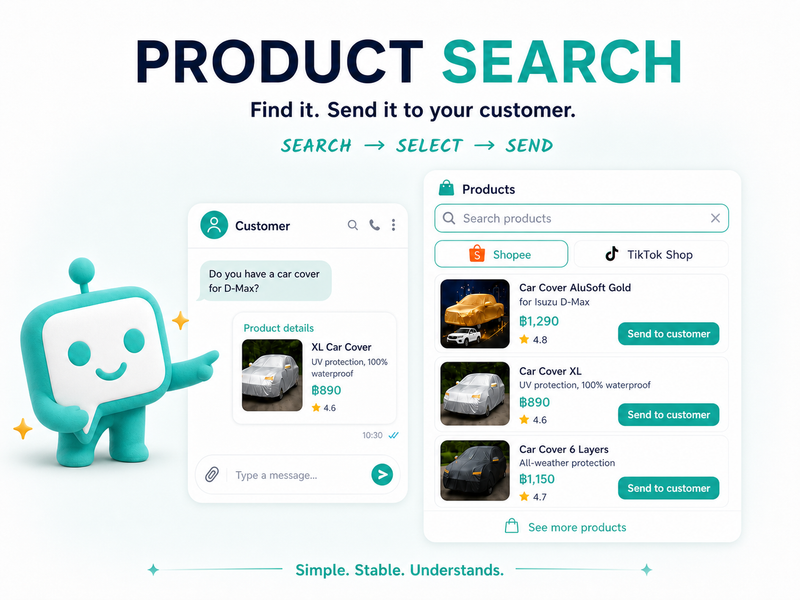
When a customer asks whether a product is available, how much it costs, or which option is the best fit, the team often has to open Shopee or TikTok Shop, search for the item, copy the details, and return to the conversation. That small loop repeats throughout the day—and it can easily interrupt a good customer conversation.
Product Search in KaoJai.ai helps your team search products from connected stores in one chat, choose the right item, and send its details to the customer. Product cards can show key information such as the product image, name, price, and review rating.
In short: search → select → send, without losing the context of the conversation.
What is Product Search?
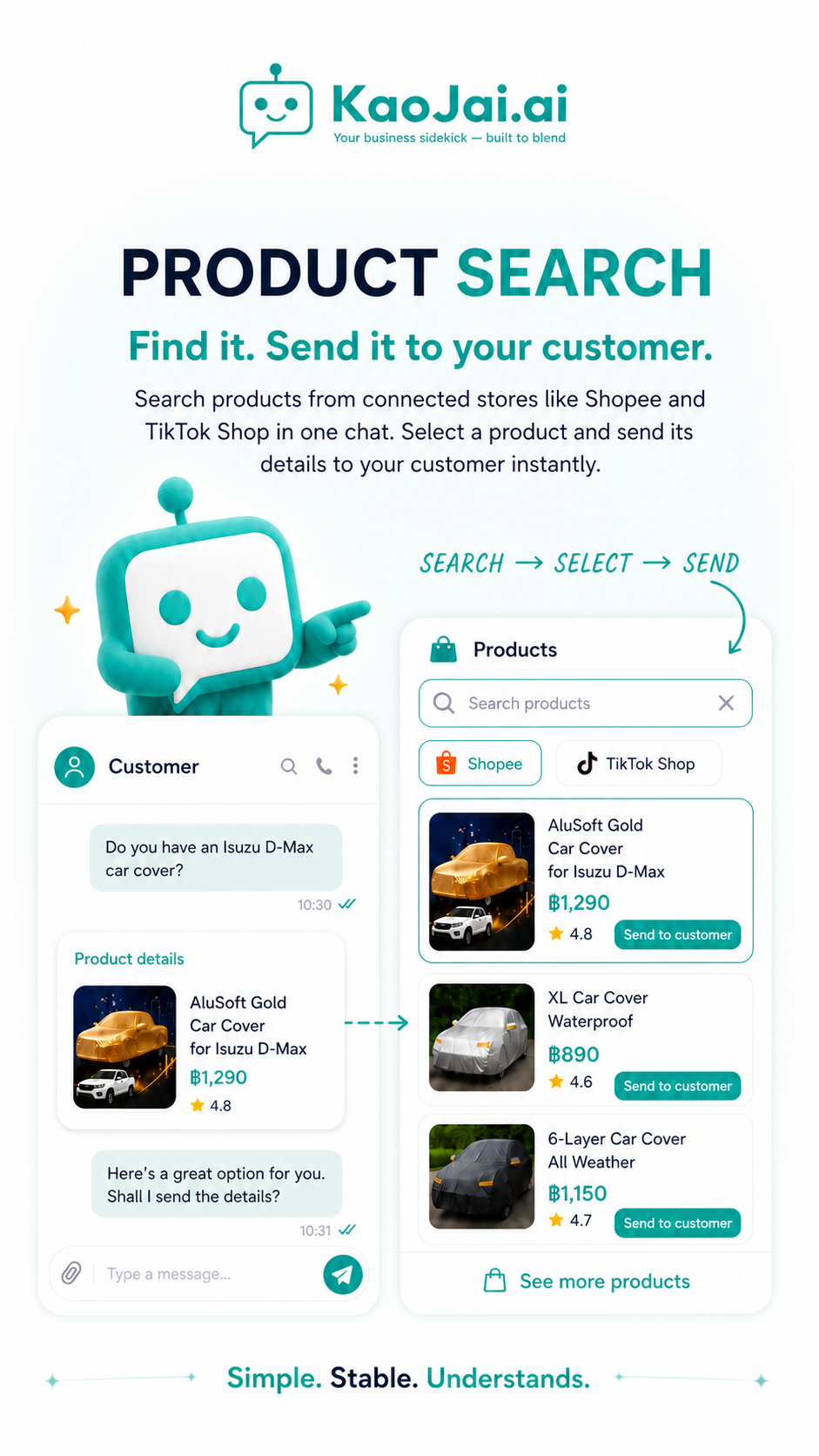
Product Search is a feature for finding products from stores connected to KaoJai.ai. While handling a conversation, your team can open the Products panel, enter a search term, choose a connected channel such as Shopee or TikTok Shop, and review matching products in one place.
Each result can show the details your team needs before sending, including the image, product name, price, and review rating. Select the item and click Send to customer to place its details directly in the conversation.
Search → select → send: a shorter workflow
1. Search using the customer’s words
Start with the phrase the customer used, such as car cover, rain jacket, or a product model. Your team can begin from the Products panel while staying in the conversation instead of deciding which store page to open first.
2. Select the product that fits
Choose the store tab you want to search, then compare the results by image, name, price, and review rating. Keeping these details on the product card makes it easier to check the item before sending it.
3. Send the details to the customer
Click Send to customer. The product card appears in the conversation in a format that is easier to read, and your team can continue with a personal recommendation or a follow-up question in the same thread.
| Step | What the team does | What the customer gets |
|---|---|---|
| Search | Enter a search term and choose a connected channel | A faster start from the customer’s question |
| Select | Review the image, name, price, and rating | Product information checked by the team before sending |
| Send | Send the product card into the conversation | Product details in the chat, ready for the next question |
From a product question to a useful reply
Imagine a customer asks, “Do you have a car cover for an Isuzu D-Max?”
Instead of opening a store, searching, comparing listings, and typing the answer from scratch, the team can open Products, search for car cover, review the available options, and send the most relevant product card in a few steps.
The team can then add the human context around the product card:
This option is suitable for an Isuzu D-Max. Would you like me to show you another style as well?
Product Search removes repetitive lookup and copy-paste work. It does not remove the team’s judgment or the personal care that makes a sales conversation helpful.
How Product Search helps the team
Less repeated copy and paste
Your team does not have to switch screens every time a customer asks about a different item. Searching and sending product details happen much closer together.
Conversation context stays in view
The team searches while handling the customer’s message, so it is easier to keep track of the model, category, or need the customer mentioned.
Product details are easier to read
The product card groups the image and key details in a consistent format. Customers can understand the option faster, while the team can continue helping them choose.
A clearer shared workflow
Sales and customer-service teams can follow the same search, select, and send flow from one inbox instead of each person manually formatting product information in a different way.
Who is it for?
Product Search is useful for teams that answer product questions regularly, especially:
- Stores and brands connected to multiple channels such as Shopee and TikTok Shop
- Customer-service teams that answer product questions from one inbox
- Sales teams with many models, styles, or products to compare
- Businesses that want faster product lookup while keeping people responsible for recommendations
Three tips for using it naturally
- Start with the customer’s words — Use the phrase from the conversation first, then add a model or product type if you need a narrower result.
- Check before sending — Review the image, name, price, and rating shown on the card so the item matches the customer’s question.
- Add a short recommendation — The card provides the details; your team can add context about fit, use, or the next option to consider.
Frequently asked questions
What is Product Search?
It is a KaoJai.ai feature that helps your team search products from connected stores, choose an item, and send its details into the conversation from one workflow.
Which channels can I search?
The feature examples include connected stores such as Shopee and TikTok Shop. Available channels depend on the business’s connections and account permissions.
Do I need to switch to another store page every time?
No. Your team can search and choose products from the Products panel while handling the conversation, reducing the need to move between screens for every product question.
What does the customer receive?
The customer receives the product card selected by the team. Depending on the item, the card can include its image, name, price, and review rating.
Does Product Search replace the sales team?
No. Product Search speeds up lookup and sending. The team still chooses the right product, explains the details, and takes care of the customer’s needs.
Who should use Product Search?
It is a good fit for teams that answer product questions often, manage connected stores across several channels, or spend too much time switching between chat and store pages.
Find it, send it, and keep the conversation moving
Product Search makes questions like “Which options do you have?” or “Can I see the product details?” easier to answer. Your team can search, choose the relevant item, and send its details from the same place where the customer is already talking to you.
If your team spends too much time switching screens to find products, talk to the KaoJai.ai team and see how Product Search could fit into your sales and customer-service workflow.