
Highlights
สนามทดลองแชตบอท (Playground)
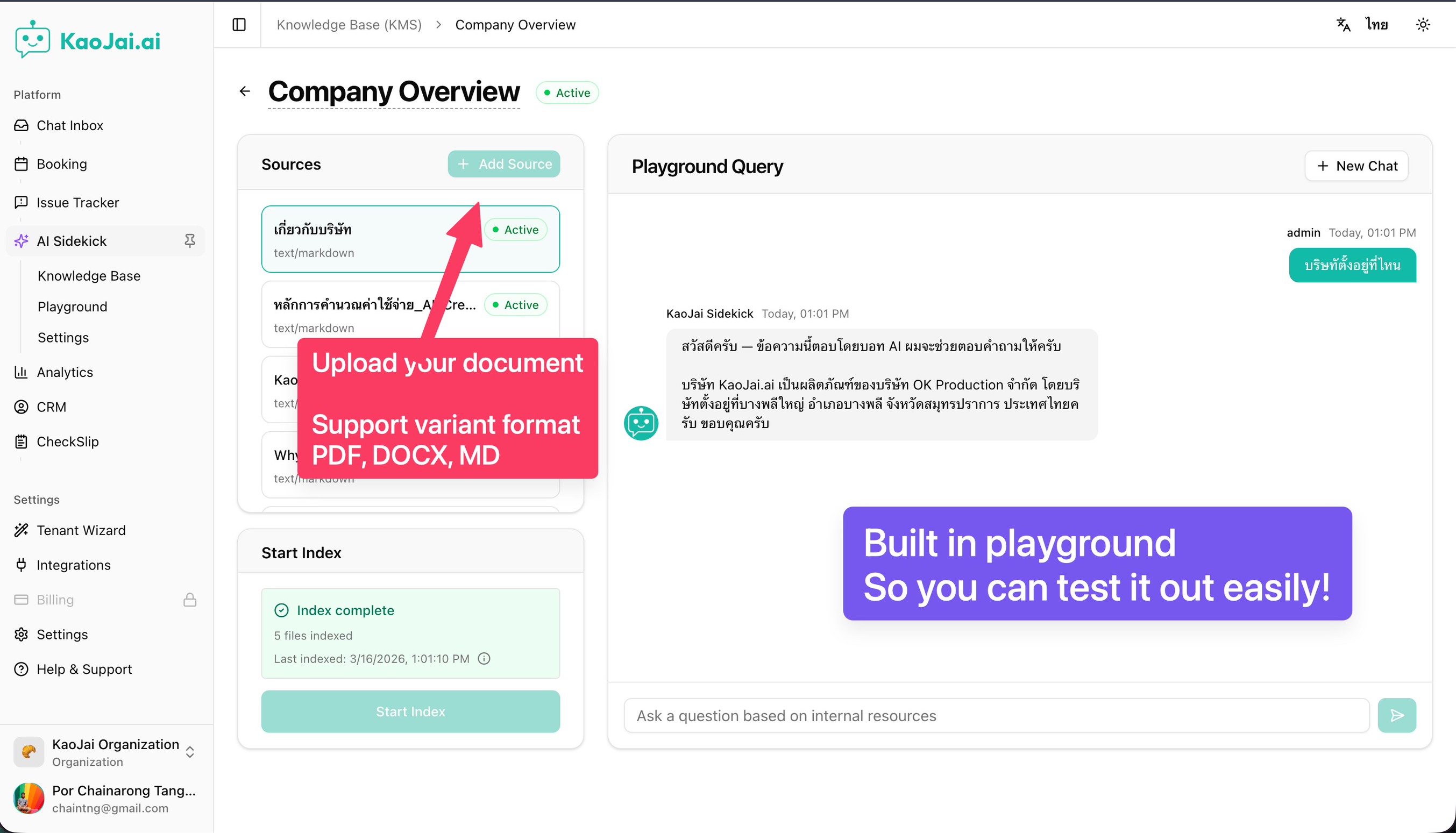
ทดลองทักษะที่คุณเปิดใช้งานและปรับแต่งได้ทันที เพื่อดูคำตอบของบอทก่อนนำไปใช้งานจริง รวมถึงความรู้จากคลังความรู้ของคุณ
ตัวช่วยเริ่มต้นใช้งานแบบใหม่
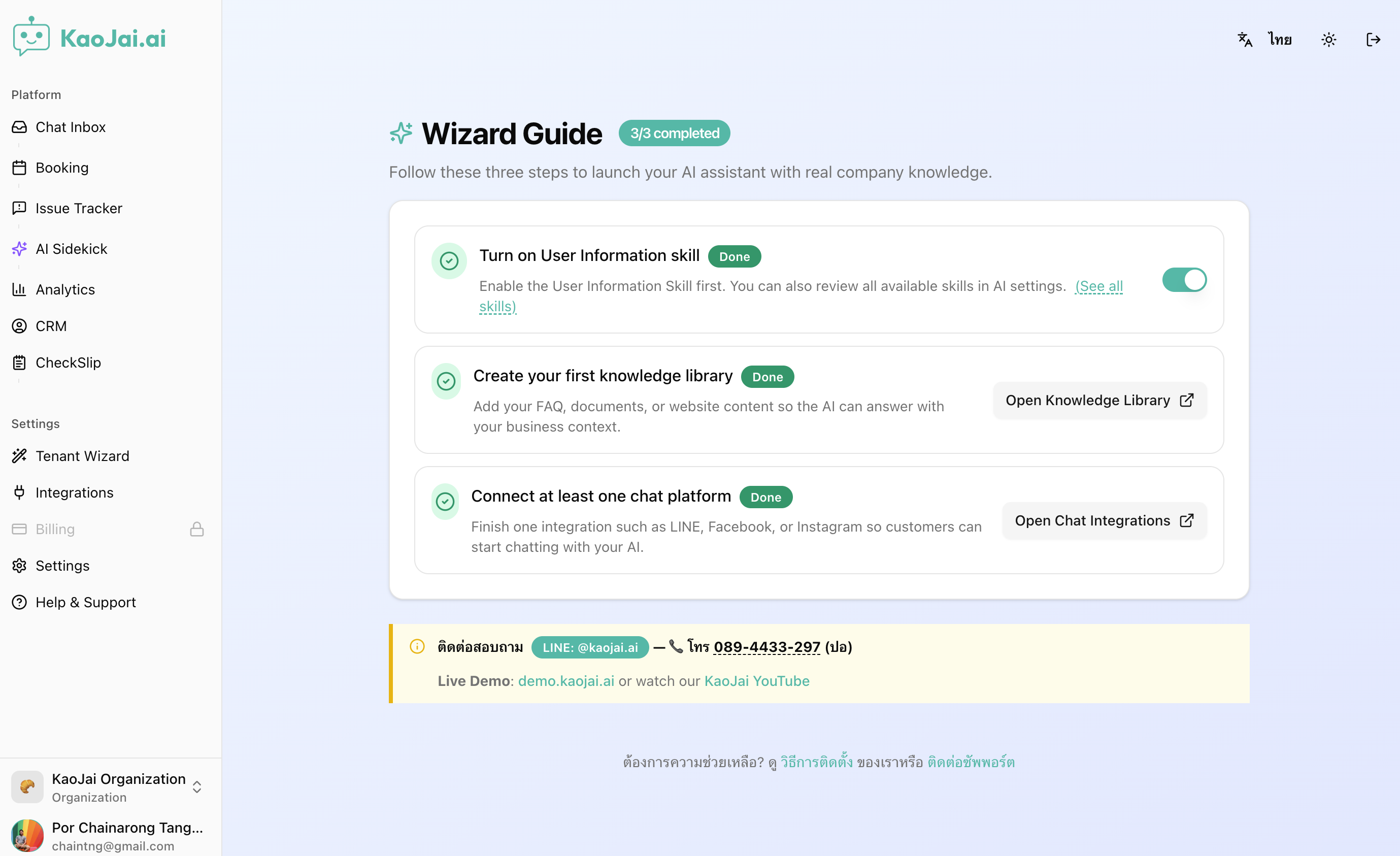
ตั้งค่าแชตบอท AI ได้ใน 3 ขั้นตอน เข้าใจง่าย ทำตามได้เร็วขึ้น
คลังความรู้ + ทักษะ FAQ เพื่อคำตอบที่ฉลาดขึ้น
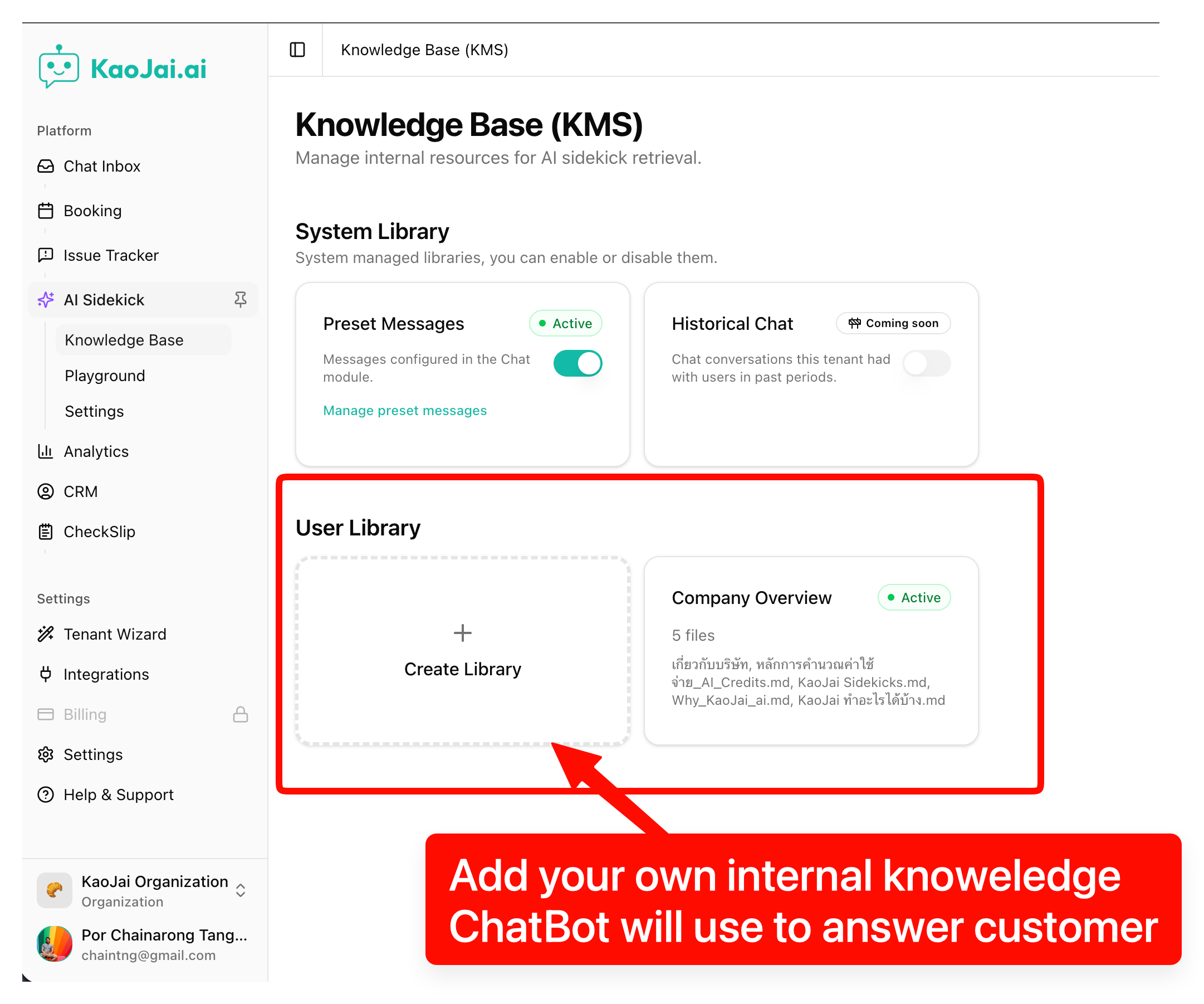
สร้างคลังความรู้จากข้อมูลขององค์กร แล้วให้บอทตอบคำถามที่พบบ่อยได้แม่นยำและสม่ำเสมอยิ่งขึ้น
ฟีเจอร์
- รับข้อความเข้าได้เร็วและเสถียรกว่าเดิม
- ปรับการรับข้อความเข้าให้ลดความหน่วงและปัญหาหมดเวลา
- ช่วยให้การตอบกลับทำงานได้สม่ำเสมอ แม้ช่วงที่มีข้อความเข้าจำนวนมาก
- คีย์เวิร์ด: ความเสถียรของข้อความ, ตอบกลับเร็วขึ้น, แชตเสถียรขึ้น.
- เปลี่ยนข้อความสำเร็จรูปให้เป็นคำตอบ FAQ อัตโนมัติ
- นำข้อความสำเร็จรูปที่มีอยู่มาใช้เป็นแหล่งความรู้สำหรับคำถามที่พบบ่อย
- บอทสามารถตอบคำถามซ้ำ ๆ ได้อัตโนมัติ ลดการคัดลอกและวางของทีม
- คีย์เวิร์ด: FAQ อัตโนมัติ, ข้อความสำเร็จรูป, ซัพพอร์ตได้เร็วขึ้น.
- อัปเดตความพร้อมใช้งานได้เสถียรกว่าเดิม
- ปรับการประมวลผลการอัปเดตความพร้อมใช้งานให้ลดความหน่วง
- ช่วยให้สถานะการจองแม่นยำขึ้นเมื่อมีการเปลี่ยนแปลงจำนวนมาก
- คีย์เวิร์ด: ความเสถียรของการจอง, อัปเดตความพร้อมใช้งาน, การทำงานลื่นขึ้น.
- โหมดให้เจ้าหน้าที่รับช่วงต่ออย่างราบรื่น
- เมื่อเจ้าหน้าที่เริ่มตอบ ระบบอัตโนมัติจะหยุดตอบให้อัตโนมัติ
- ช่วยไม่ให้บอทแทรกกลาง และทำให้บทสนทนาชัดเจนขึ้น
- คีย์เวิร์ด: ส่งต่อให้เจ้าหน้าที่, รับช่วงต่อ, บริการลูกค้า.
- รองรับการใช้งานมากขึ้น ประสิทธิภาพคงที่
- ปรับการทำงานเบื้องหลังให้รองรับการเติบโตได้ราบรื่นขึ้น
- ใช้งานได้ลื่นไหลและสม่ำเสมอมากขึ้นในช่วงที่มีผู้ใช้งานหนาแน่น
- คีย์เวิร์ด: เพิ่มประสิทธิภาพ, รองรับการใช้งานจำนวนมาก, ระบบเสถียร.
- ประมวลผลข้อความได้เสถียรกว่าเดิมในช่วงแชตหนาแน่น
- ปรับวิธีจัดการเมื่อมีหลายข้อความเข้ามาพร้อม ๆ กัน
- ลดโอกาสที่ข้อความใหม่จะถูกข้ามระหว่างที่ระบบกำลังประมวลผล
- คีย์เวิร์ด: ประมวลผลข้อความ, ความเสถียรของแชต, ลดข้อความตกหล่น.
- กำหนดสิทธิ์ตามบทบาทในการใช้งานส่วนแอดมิน
- หน้าจอส่วนแอดมินแสดงการใช้งานให้สอดคล้องกับสิทธิ์ของแต่ละบทบาทมากขึ้น
- ช่วยให้ทีมทำงานเป็นระเบียบ โดยเห็นเฉพาะสิ่งที่ควรทำได้ตามหน้าที่
- คีย์เวิร์ด: กำหนดสิทธิ์ตามบทบาท, สิทธิ์การเข้าถึง, จัดการทีม.
- เอเจนต์อัตโนมัติที่คุยเป็นขั้นตอนมากขึ้น
- ปรับการสนทนาอัตโนมัติให้มีกติกาชัดเจนขึ้น และจัดการได้ปลอดภัยขึ้น
- ถามข้อมูลที่ยังขาดก่อนดำเนินการขั้นต่อไป ทำให้คุยเป็นขั้นตอนมากขึ้น
- คีย์เวิร์ด: เอเจนต์ AI, แชตอัตโนมัติ, ซัพพอร์ตอัตโนมัติ, แชตแบบมีขั้นตอน.
แก้ไขบั๊ก
- ปรับการเปิดลิงก์ในแอปที่ติดตั้งให้ถูกต้องขึ้น — แก้ปัญหาที่ทำให้บางลิงก์เปิดไม่ถูกต้อง เพื่อให้ใช้งานได้เสถียรมากขึ้น
- สร้างทิกเก็ตได้แม้แนบรูปมากขึ้น — แก้ปัญหาที่ทำให้สร้างทิกเก็ตไม่สำเร็จเมื่อแนบรูปจำนวนมากเกินไป
- เก็บข้อความที่ตกหล่นได้ครบถ้วนขึ้น — แก้ปัญหาที่ทำให้บางข้อความที่ตกหล่นถูกเก็บไม่ครบ
- ประวัติแชตแสดงผลถูกต้องขึ้นในหลายทิกเก็ต — แก้ปัญหาที่ทำให้ประวัติแชตแสดงไม่ถูกต้องในบางทิกเก็ต
- ตรวจสอบความพร้อมใช้งานระหว่างเริ่มต้นได้แม่นยำขึ้น — แก้ปัญหาที่ทำให้การตรวจสอบความพร้อมใช้งานระหว่างการเริ่มต้นใช้งานมีความคลาดเคลื่อน
- การส่งรูป/สื่อมีความเสถียรมากขึ้น — แก้ปัญหาที่ทำให้การส่งข้อความแบบสื่อ (เช่น รูปภาพ) ล้มเหลวหรือทำงานผิดปกติ
- การแจ้งเตือนเมื่อเหตุการณ์รุนแรงทำงานได้เสถียรกว่าเดิม — แก้ปัญหาเพื่อให้การแจ้งเตือนเร่งด่วนทำงานและส่งต่อได้เชื่อถือได้มากขึ้นเมื่อจำเป็น
- หน้ารายการปัญหาอ่านง่ายขึ้น — แก้ปัญหาการแสดงผลและรูปแบบหน้าในหน้ารายการปัญหา เพื่อให้ดูชัดเจนขึ้น
Highlights
Chatbot Playground

Try out the skills you’ve enabled and customized—so you can see how your bot answers before going live, including knowledge from your library.
New onboarding wizard

Set up your AI chatbot in 3 simple steps—faster, clearer, and easier to follow.
Knowledge library + FAQ skill for smarter answers

Create a knowledge library from your company content and let the bot answer FAQs more accurately and consistently.
Features
- Faster, more reliable incoming messages
- Incoming messages are now handled in a way that reduces delays and timeouts.
- This helps keep replies consistent—even during busy periods.
- Keywords: message reliability, faster responses, chat stability.
- Turn saved replies into instant FAQ answers
- Use your existing saved replies as a knowledge source for common questions.
- The bot can answer repetitive FAQs automatically, with less manual copy‑and‑paste.
- Keywords: FAQ automation, saved replies, faster customer support.
- More dependable availability updates
- Improved how availability updates are processed to reduce delays.
- Helps keep booking status accurate when there are many changes.
- Keywords: booking reliability, availability updates, smoother operations.
- Human takeover for smoother handoffs
- When a human agent starts replying, automated responses pause automatically.
- This prevents the bot from interrupting and keeps conversations clear.
- Keywords: human handoff, agent takeover, customer support.
- Improved scalability for consistent performance
- Background processing has been improved to handle growth more smoothly.
- You’ll see more consistent performance during high traffic.
- Keywords: performance improvements, scalability, platform stability.
- More reliable message processing during busy chats
- Improved how multiple messages are handled when they arrive close together.
- Reduces the chance of a new message being missed during ongoing processing.
- Keywords: message processing, chat reliability, missed messages.
- Role-based access in the admin experience
- Admin screens now better match what each role is allowed to do.
- Helps teams stay organized by showing the right actions to the right people.
- Keywords: role-based access, admin permissions, team management.
- Smarter automated agent for structured conversations
- Improved automated conversations with clearer rules and safer handling.
- Better at asking for missing details before taking the next step.
- Keywords: AI agent, automated conversations, customer support automation, guided chat.
Bug Fixed
- Improved link handling in the installed app — Fixed an issue where some links could open incorrectly, improving reliability.
- Ticket creation now supports more images — Fixed an issue that prevented creating a ticket when too many images were attached.
- More complete capture of missed messages — Fixed an issue where some missed messages weren’t collected properly.
- Chat history displays correctly on more tickets — Fixed an issue where chat history could appear incorrect for some tickets.
- Onboarding availability checks are more accurate — Fixed an issue where availability checks during onboarding could be unreliable.
- Media sending is more reliable — Fixed an issue that could cause media messages to fail or behave unexpectedly.
- Improved alert escalation reliability — Fixed an issue to ensure urgent alerts escalate more reliably when needed.
- Cleaner issue list layout — Fixed styling and layout issues on the issue list page for a clearer view.