
A shopper asks “Is this available in blue?” under a post while your team is answering messages in the inbox. Now your team can open that comment and reply under the original post from KaoJai Inbox, for connected Facebook Pages and Instagram accounts.
See the original post before you reply
Open a conversation marked Public to see the original post and its comments together. If someone asks about a color under your new collection post, select their comment and reply “Yes, blue is in stock! 💙” Anyone viewing the post can see the answer too.
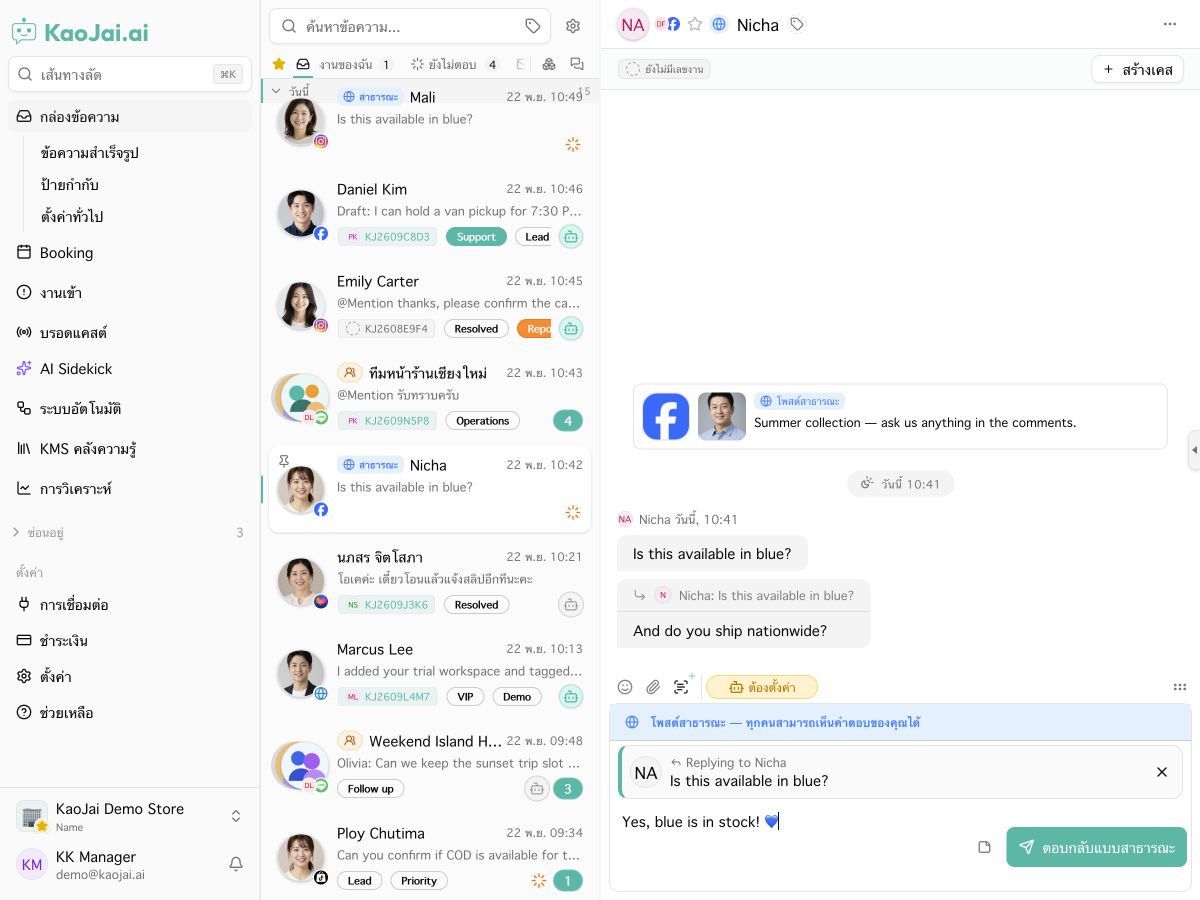
In KaoJai Demo, the Facebook reply composer shows the comment you selected.
How to reply from the Inbox
- Open Inbox in KaoJai Admin and select a conversation marked Public.
- Click Reply on the comment and check the quoted comment in the composer.
- Type your answer and click Post public reply. It appears under the comment on Facebook or Instagram.
If you need a phone number, address, or order number, ask the customer to share it in a private message.
Get started with your Page or account
Open Integrations in KaoJai Admin to connect your Facebook Page or Instagram professional account. If you’ve already connected it and new comments aren’t appearing, check Show public comments under the Inbox settings gear. If the connection needs additional permissions, reconnect the same account and grant comment access when prompted.