
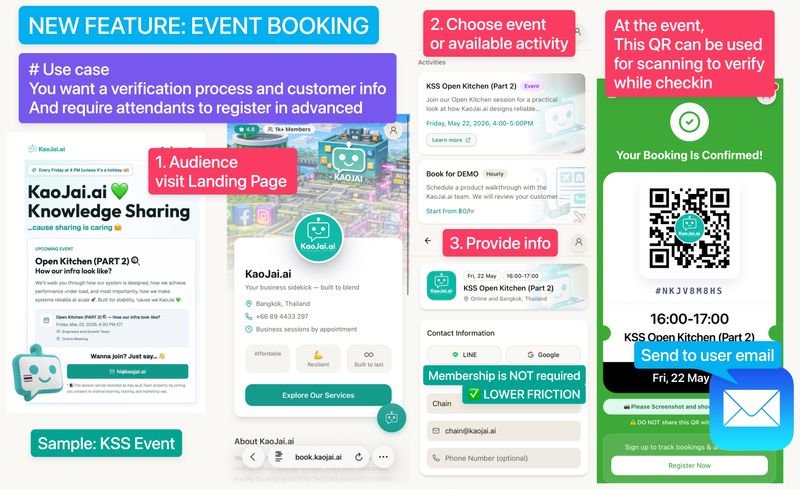
Many businesses do not only book resources such as courts, rooms, Personal Trainer hours, or the owner’s own time. They also run another kind of activity that should be managed as an “event”, such as webinars, workshops, classes, product launches, community activities, or demo sessions for new customers.
Previously, most booking items were designed around resource booking. That works well when bookings must reserve a limited resource such as a court, room, or provider time. Events are different because they usually have a fixed date, time, and number of seats from the beginning.
KaoJai.ai added Event Booking to the Frontdoor module so admins can manage events as another booking item type, separate from regular resource booking, and accept registrations in a way that fits the activity better.
Frontdoor is the customer’s front door
Frontdoor is a dedicated web page for each business on KaoJai.ai where customers can view information, contact the team, start chat, book services, or view their own usage history in one place.
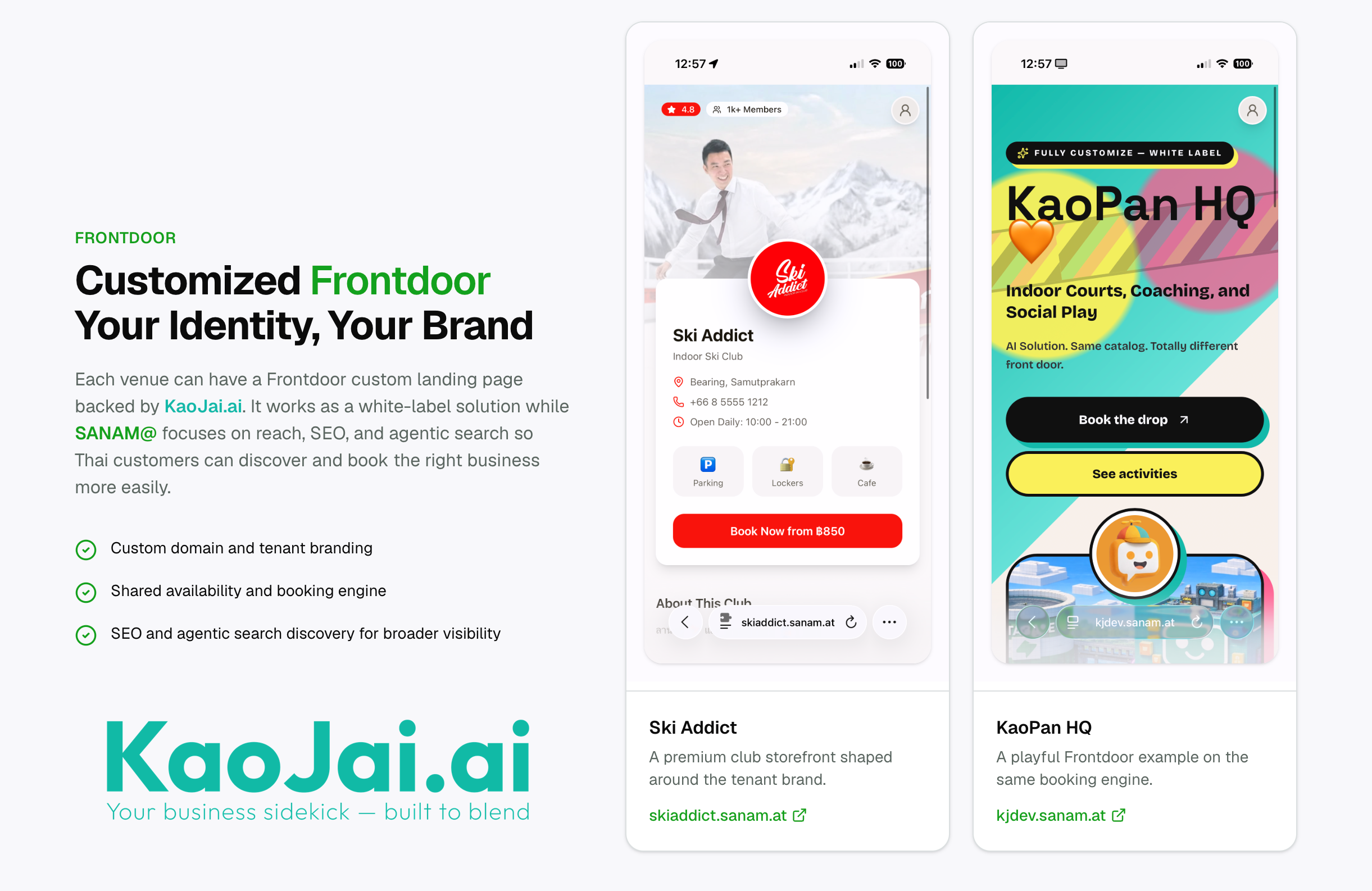
For businesses with many channels such as LINE, Facebook, a website, or ad campaigns, Frontdoor brings entry points together so customers can take the next action immediately, whether asking questions, booking a time, or registering for an activity.
With Event Booking, Frontdoor no longer supports only resource booking. It also supports a booking item type for events with clear schedules and capacity greater than one.
How Event Booking differs from Resource Booking
Resource Booking usually starts with the question: “Which date, time, and resource does the customer need?” This works well for businesses with resources that must not overlap, such as courts, meeting rooms, class tables, or provider time.
Event Booking is another booking item class where the admin sets event details in advance, such as date, time, activity details, location or online channel, and capacity.
From the customer perspective, the experience changes from choosing a slot or resource to choosing the event they want to join, viewing activity details, and confirming registration.
The key difference is that Event Booking supports many participants in the same event, limited by quota or seat capacity, instead of blocking one resource for one time slot like resource booking.
What kind of business is this for?
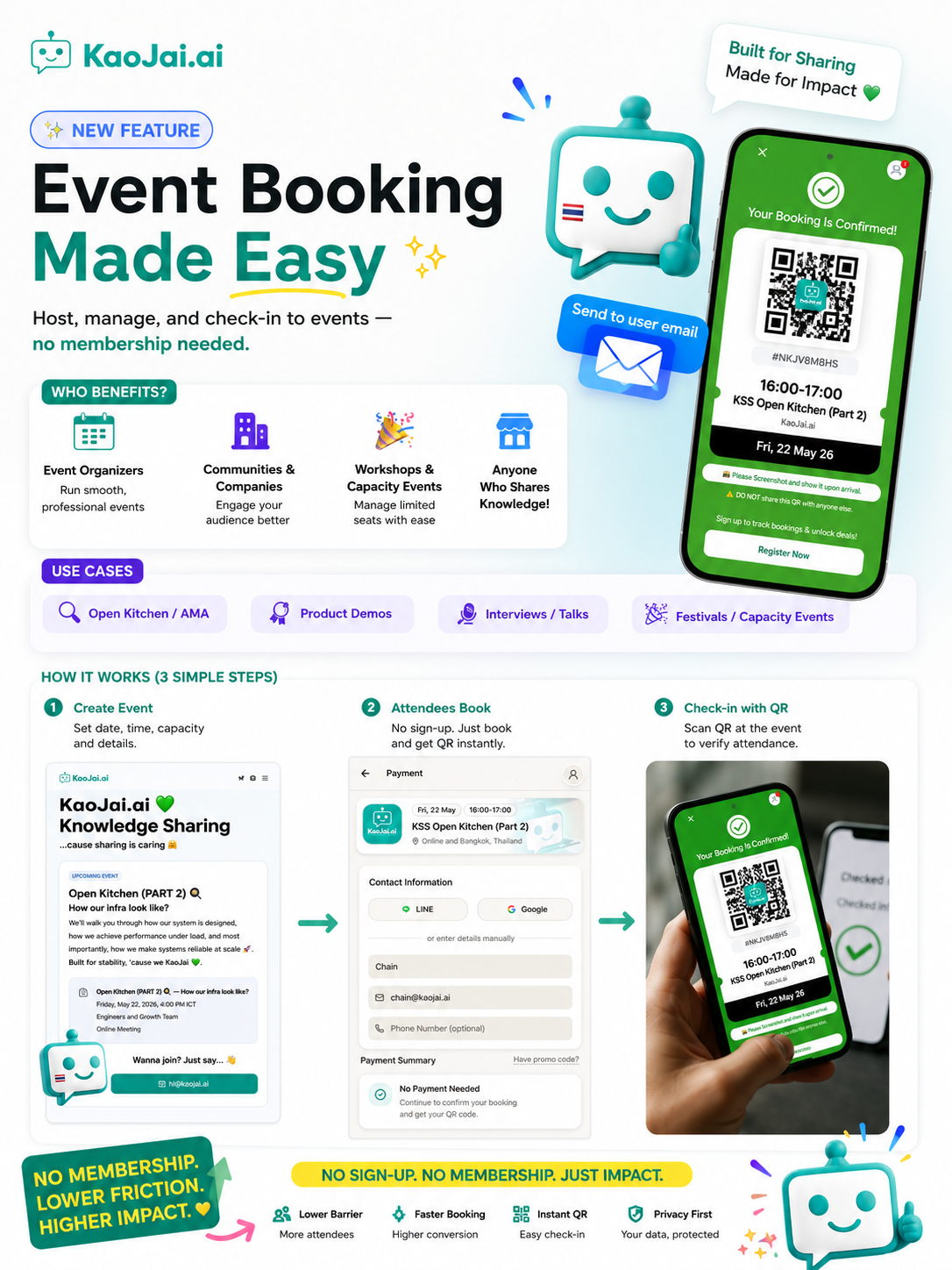
Event Booking fits businesses that want customers to register for activities with clear date, time, and seat limits, such as:
- Webinars or product demos with one session and meeting links sent to registrants
- Workshops, classes, or knowledge-sharing sessions with limited seats
- Community activities, partner events, or launch events that need attendee lists
- Free activities where customers should confirm attendance without payment steps
- Activities that require post-registration information, such as FAQ, preparation details, consent notice, meeting link, or supporting documents
For example, KaoJai Knowledge Sharing can create an event item for one online session, set date, time, capacity, and follow-up content. After registration, customers receive a booking QR or ticket and see additional details such as a Google Meet link, video recording notice, and links to read more.
Easier because membership is not required
One reason customers fail to complete bookings is that there are too many steps, especially being forced to create an account before they only want to book or buy a ticket for one event.
KaoJai.ai Event Booking is designed so the flow can adapt to each business context, starting with as little information as possible, such as using one email address as proof for sending a ticket or QR to the customer.
Think of it like buying a movie ticket. Customers do not need to register as members every time. They only need a way to receive the ticket and use it to confirm their right to attend. Membership can remain optional for customers who want to keep history, view past bookings, or use other services later.
Easy verification with QR check-in and transferable rights
For events, registration is not the only important step. Verification before or during the event matters too. Event Booking helps teams use tickets or QR codes to verify attendance rights clearly, reduce manual list checking, and know which tickets have already been used.
The ticket concept is similar to a movie ticket: the right to attend belongs to the ticket holder at that time. If a customer wants to transfer or resell a ticket, the business owner does not need to act as a middleman every time, because whoever holds the valid ticket can use it to verify attendance.
However, some businesses may want rights to stay tied to the original buyer, such as events requiring identity checks, member-only classes, or events that do not allow transfer. Admins can disable this pattern so ticket verification matches each business policy.
Helps sales and service teams continue work more easily
Event Booking does not stop at having a registration form. It connects with the wider KaoJai.ai Platform.
When customers register through Frontdoor, businesses can use that data for sales, service, and follow-up, such as seeing which activity customers are interested in, sending preparation information, reducing repeated questions, and helping the team understand context before talking to customers.
For businesses using Frontdoor together with chat, booking history, and customer accounts, customers get a more continuous experience. They do not just fill in a form and disappear. They can return to view history or talk with the team through the same channel.
Summary
Event Booking on Frontdoor helps KaoJai.ai support more booking item types: resource booking for reserving resources, and event booking for activities with clear date, time, and capacity.
What businesses get:
- Admins can manage events as a separate booking item type from resource booking.
- Event pages show details, date and time, location, or online channel clearly.
- Participant count can be limited by capacity or quota.
- Booking steps can be reduced without forcing membership, starting from an email for sending the ticket.
- Ticket or QR for registration confirmation.
- Attendance verification through ticket or QR to reduce manual list checking.
- Support for the idea that rights belong to the ticket holder, with admin control to disable it based on business policy.
- Post-registration information space such as meeting link, FAQ, notice, and follow-up links.
If your business has workshops, webinars, classes, demo days, or activities that require registration, Event Booking is another way KaoJai.ai helps turn customer interest into real attendance more easily.